Spotify QR Code Generator
On this page
Welcome to our Spotify QR code generator. Whether you are an artist promoting a new release or a podcaster sharing your latest episode, this tool allows you to create a custom QR code that directs users straight to your audio. Below, you will find instructions on how to use this tool, a comparison between proprietary Spotify Codes and standard QR codes, and a research-based look at how offline-to-online marketing drives listener engagement.
How to Use This Tool
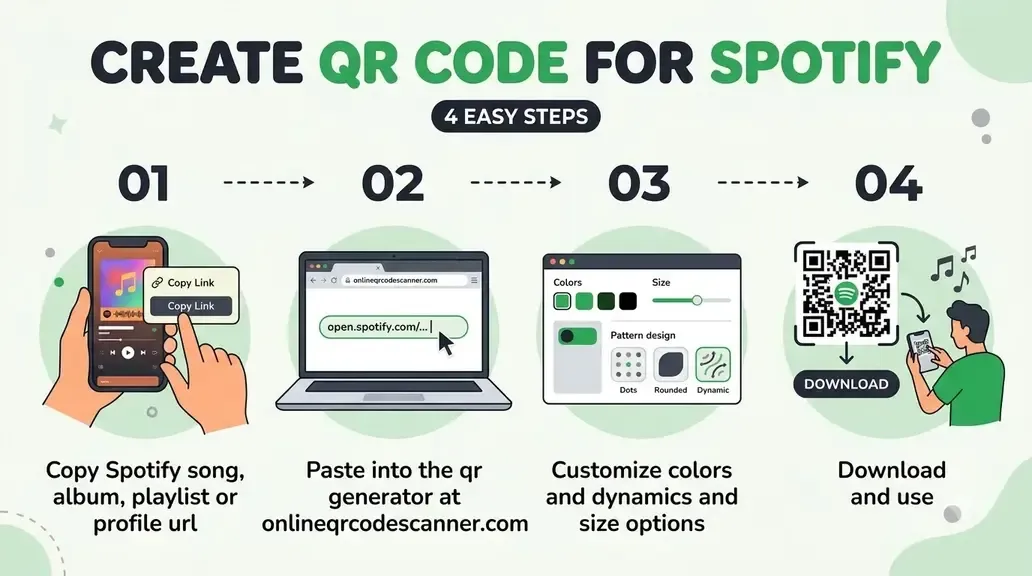
- Get the Spotify link. Open Spotify on mobile or desktop, tap the three-dot menu next to any track, album, artist, playlist, show, or episode, then select Share → Copy link. The URL will look like
open.spotify.com/track/...oropen.spotify.com/album/.... - Paste it above. Drop the link into the input field. The QR code generates immediately.
- Customize if needed. Change the color or add a logo to match your branding.
- Download and use. Export as PNG for digital use or SVG for print. SVG scales cleanly to any size, making it the best choice for print.
One practical tip: remove the ?si=... tracking parameter at the end of Spotify share links before pasting. It does not affect where the link goes, but a shorter URL produces a less complex QR code that scans more reliably at smaller print sizes.
Spotify Codes vs Standard QR Codes
Spotify has its own proprietary scanning system called Spotify Codes, which are the soundwave-shaped barcodes inside the app. They work only when scanned by the built-in camera inside the Spotify app itself. A regular phone camera cannot read them.
A standard QR code built from your Spotify link (open.spotify.com/...) works differently. Any phone camera reads it. On most devices, it deep-links directly into the Spotify app if installed; if not, it opens the web player in a browser instead.
This distinction matters in real-world use. For a flyer at a concert, a business card, or physical product packaging, you cannot control whether the person scanning has the Spotify app open, or even installed. Spotify’s own Codes are fine for casual in-app sharing. For anything printed or distributed publicly, a standard QR code from the share link is the right tool.
What You Can Link To
This tool encodes whatever URL you paste. Spotify’s link structure covers:
open.spotify.com/track/...: A specific song, ready to stream immediately.open.spotify.com/album/...: A full album page, useful for promoting new releases.open.spotify.com/artist/...: Your artist profile, suited for business cards and press kits.open.spotify.com/playlist/...: A curated playlist, handy for event setlists or themed collections.open.spotify.com/show/...: A podcast show landing page.open.spotify.com/episode/...: A specific podcast episode, convenient for newsletters and presentation slides.
Why Artists and Podcasters Actually Use This
The practical value is friction reduction. Research into mobile marketing QR code adoption, including findings by Ryu and Murdock (2013) in the Journal of Direct, Data and Digital Marketing Practice, highlights ease of use as the primary factor determining whether people follow through on a call to action. Typing a search query requires several steps of friction; scanning a square takes a single gesture.
Concrete use cases where this matters:
Merch tables at live shows. A printed QR code on a card next to your vinyl or t-shirts lets someone follow you on Spotify before they even leave the venue. They are already interested, and the code lets them follow you with a single tap.
Physical album packaging. CD inserts and vinyl sleeves with a QR code linking to the Spotify release give buyers an immediate way to add it to their library and playlists. That contributes directly to stream counts.
Podcast episode slides and show notes. A QR code linking to a specific episode removes the friction of searching for the show and then hunting for the right episode number.
Press kits and EPKs. A QR code in a press kit PDF takes a journalist or promoter directly to your artist page instead of asking them to search for you. That is the difference between hoping they find you and knowing they land.
Related Tools:
- YouTube QR Code Generator
- TikTok QR Code Generator
- Twitch QR Code Generator
- Odysee QR Code Generator
Frequently Asked Questions
Can I generate a QR code for a playlist I did not create?
Yes. Any public Spotify link works including playlists by other users or collaborative playlists as long as the URL is accessible. The QR code just encodes the link it has no concept of ownership. If the playlist later becomes private, the code will still scan but Spotify will show a “content not available” message.
Will scanning the QR code open the Spotify app or a browser?
On most modern smartphones, the native camera app recognizes the open.spotify.com URL and offers to open it in the Spotify app directly, if it is installed. If not, it opens in the mobile browser where the Spotify web player runs. Either way, the listener reaches the content. No special QR scanner is needed.
Does Spotify’s built-in QR Code feature do the same thing?
Not exactly. Spotify’s native Codes are proprietary barcodes that only the Spotify app scanner can read; a regular phone camera cannot scan them. This tool generates a standard QR code from your share URL, which any camera reads and which falls back to the web player if the app is missing. You also get customization options (colors, logo) that Spotify’s own Code does not offer. If you want a QR code for distribution beyond one-on-one sharing, use this tool.
Do QR codes generated here expire?
No. A static QR code is just an encoded URL with no server and no expiry. It works as long as the Spotify content it points to is still live. If you later delete a playlist or a track gets removed from the platform, the code scans fine but Spotify returns an error, but the code itself is still valid.
Can I link to a specific timestamp in a podcast episode?
Spotify share URLs do not natively support timestamps the way YouTube does. A QR code linking to a Spotify episode URL will open the episode from the beginning. If you need to point someone to a specific moment, link to the episode page and print the timestamp as text next to the QR code (for example: “Scan to listen, skip to 14:30 for the interview”).
How small can I print a Spotify QR code and still have it scan reliably?
No smaller than 1 x 1 inch (2.5 x 2.5 cm) for reliable scanning at a normal distance. Below that, older devices and low-light conditions can fail to read it. Download the SVG version for printed assets. A designer can scale it up for a poster or down for a business card without losing sharpness.
Author

Abhishek
Software Engineer & Privacy Advocate
Abhishek is a software engineer and privacy advocate specializing in building fast, secure, and client-side utility applications. He focuses on creating browser-based tools that keep user data local and private.