TikTok QR Code Generator
On this page
This tool generates standard QR codes for any TikTok profile, individual video, product listing, or hashtag. Below, you will find instructions for creating your code, the differences between standard QR codes and TikTok’s in-app sharing codes, and tips for printing them on physical materials.
How to Use This Tool
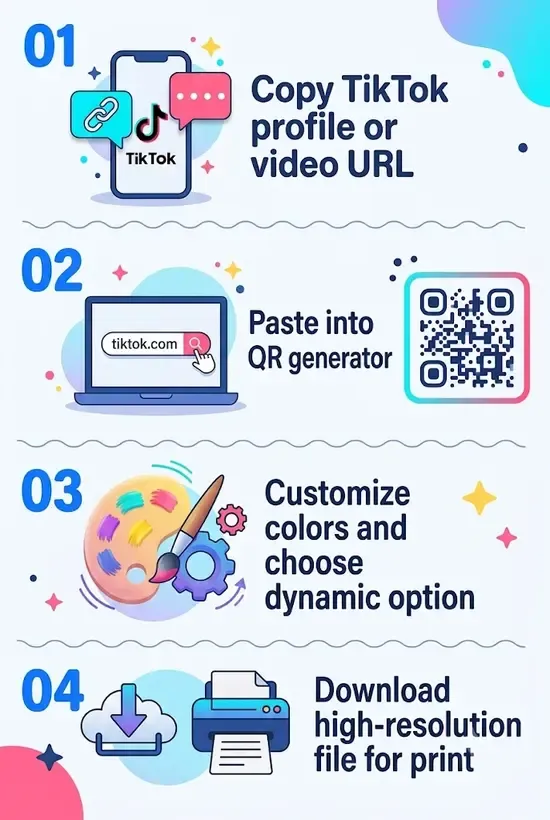
- Copy your TikTok link. On any video, profile, or TikTok Shop item in the app, tap Share → Copy link. For a profile, you can also just use your handle directly.
- Paste it above. Drop the URL into the input field. Your QR code generates instantly.
- Customize your design. Adjust the background colors or add your brand logo to create a visually distinct QR code.
- Download and deploy. Export as PNG for digital screens or vector SVG for crisp printing at any scale.
Why a QR Code for TikTok?
TikTok is driven by rapid trends, high user engagement, and an algorithmically mediated marketplace. However, guiding someone from a physical space (such as a retail counter, live event, or product package) to a specific TikTok video or profile is tricky if they have to search manually.
A customized TikTok QR code bridges this physical-to-digital gap instantly. Recent research applying the Technology Acceptance Model (TAM) to social commerce shows that convenience and perceived ease of use are major drivers for Gen Z and Millennial consumers. When you remove the friction of searching, you increase the likelihood of impulse engagement and purchase intention.
Concrete use cases include:
- Product packaging & unboxing inserts: Link directly to a video tutorial, behind-the-scenes clip, or user review printed on product boxes or clothing tags.
- Retail store displays & counter signage: Allow shoppers at the register to scan and follow your TikTok profile or view a product demo before completing a purchase.
- Event stands, posters & stage backdrops: Display a high-contrast QR code during live presentations or trade shows so attendees can follow your account instantly.
- On-screen video overlays & livestreams: Embed a QR code on YouTube videos, live streams, or digital billboards so viewers can jump directly to your TikTok account.
TikTok’s In-App QR Code vs. This Generator
TikTok has a built-in QR code feature (under Profile → Share Profile → My QR Code). While this is convenient for quick, in-person profile sharing, a dedicated custom QR code generator provides several essential advantages for brands and marketers:
Link Flexibility. TikTok’s native tool only generates a QR code for your main profile. This tool encodes whatever URL you paste into it. You can link to a specific viral video, a TikTok Shop product page, or a branded hashtag challenge.
Scanner Compatibility. Some proprietary app codes struggle when scanned by regular phone cameras. A standard QR code built here is universally readable by any default iOS or Android camera app.
Design Control. The in-app code has a fixed, heavily branded TikTok template. This tool allows you to change colors and add your own logo to match your physical marketing materials.
What You Can Link To
This generator encodes any public TikTok URL into a seamless mobile link:
- Profile link: Directs scanners straight to your main account page, making it effortless for new viewers to hit Follow.
- Individual Video link: Opens a specific video clip immediately, which works well for product demonstrations, campaigns, or giveaways.
- TikTok Shop link: Directs shoppers to a product page or digital store, removing extra taps between discovery and purchase.
- Hashtag or Challenge link: Directs users to a branded hashtag page, encouraging user-generated content (UGC) participation.
Related Tools:
- Spotify QR Code Generator
- YouTube QR Code Generator
- Twitch QR Code Generator
- Odysee QR Code Generator
Frequently Asked Questions
Can I link directly to an individual TikTok video or TikTok Shop item?
Yes. Copy the link of any specific video or TikTok Shop product by tapping Share → Copy link in the TikTok app, then paste it into the generator. Anyone who scans the code will land directly on that specific clip or product page.
Will scanning a TikTok QR code open the TikTok app or a mobile browser?
On iOS and Android, modern smartphone cameras detect native TikTok URLs and automatically open the TikTok mobile app directly if it is installed. If the viewer does not have the app installed, the link opens seamlessly in their default web browser.
Do QR codes generated here expire?
No. Static QR codes encode the target URL directly into the matrix pattern and have no expiry mechanism. They remain active indefinitely as long as your TikTok profile or video remains live on the platform. If you delete the video, the code will scan but TikTok will show a “video unavailable” error.
What is the recommended print size for a TikTok QR code?
For printed materials (flyers, business cards, packaging), print the QR code at a minimum size of 1 × 1 inch (2.5 × 2.5 cm). Below that, older devices and low-light conditions can cause failures. Use the downloadable SVG file to guarantee crisp, pixel-perfect scanning at any size.
How is this tool different from TikTok’s native QR code?
TikTok’s native generator only creates a standardized graphic for your main profile. This custom generator allows you to link to specific videos or shop items, customize colors and logos, and download print-ready vector files (SVG) for professional marketing materials.
Author

Abhishek
Software Engineer & Privacy Advocate
Abhishek is a software engineer and privacy advocate specializing in building fast, secure, and client-side utility applications. He focuses on creating browser-based tools that keep user data local and private.