Twitch QR Code Generator
On this page
Twitch is built around live moments, streams that happen once, communities that form in real time, and audiences that either follow you or forget you exist. That window of attention at an IRL event, a gaming convention, or even inside your own stream overlay is narrow. A QR code pointing directly to your Twitch channel is the fastest way to turn someone standing in front of you into a follower before that window closes.
Paste your Twitch channel URL (twitch.tv/yourchannel) into the tool above and get a scannable QR code instantly.
How to Use This Tool
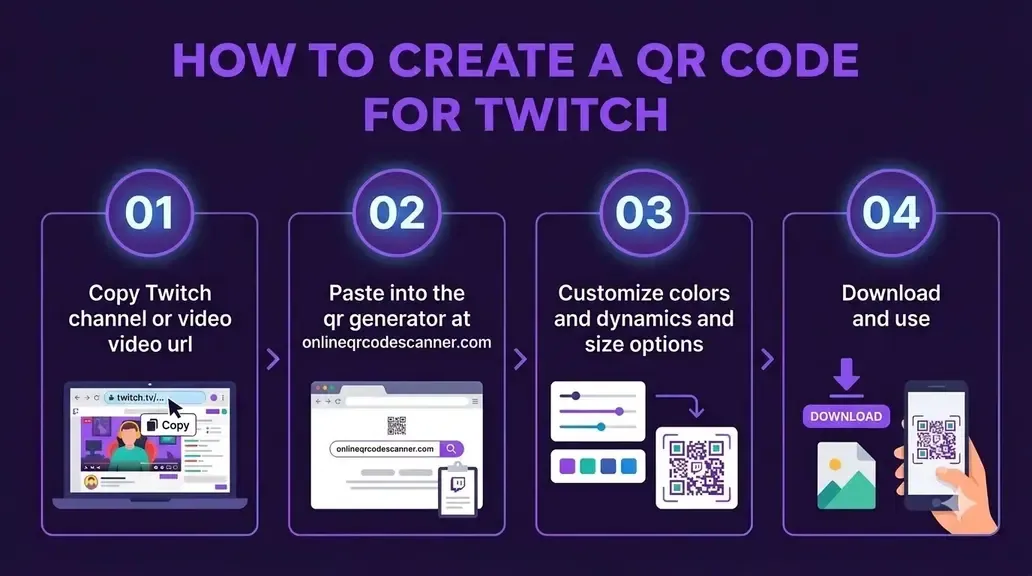
- Get your channel link. Your Twitch URL is simply
https://www.twitch.tv/[yourchannel]. You can also copy it from your browser while viewing your channel page. - Paste it above. Paste the link into the input field.
- Customize it. Change the color to match your channel’s brand, or add your logo.
- Download and place it. Use PNG for screens (overlays, Carrd, link-in-bio pages) or SVG for print (merch, business cards, convention signage).
The Problem That Twitch QR Codes Actually Solve
Most platforms have a search-and-follow workflow that is good enough. Twitch has a specific problem that makes QR codes genuinely more useful here than on other platforms.
Twitch usernames are often creative, character-limit-pushing handles that are hard to spell from memory, especially when someone is trying to type it on their phone at a convention, mid-conversation, or after watching a stream clip on a friend’s screen. The moment you leave that interaction, you have probably lost them.
According to Twitch Tracker, there are roughly 7 million active monthly streamers competing for attention. The discoverability gap between a channel at 0 followers and one at 1,000 is enormous, Twitch’s algorithm strongly favors channels that already have a following. Every real-world interaction that converts to a follow matters disproportionately in the early stages of channel growth.
A printed or on-screen QR code changes the dynamic. Scan, land on the channel, tap Follow. It takes only three seconds.
Where Twitch Streamers Actually Use QR Codes
Gaming conventions and LAN events. Events like PAX, Gamescom, DreamHack, and EVO are packed with people who watch streams. Handing out a card with a QR code linking to your channel, or displaying one at your booth, turns a five-second interaction into a follower. Creator discussions consistently show that attendees who scan in person have higher long-term retention than algorithmic viewers because a direct personal interaction already happened.
Stream overlays (Starting Soon, BRB, and End screens). Mid-gameplay is the wrong time for a QR code because it competes directly with stream action. The most effective placements are your starting-soon screen, your break screen, and especially your end screen where viewer attention naturally shifts to next steps.
Merch and physical products. If you produce channel merchandise like hoodies, stickers, or mousepads, adding a QR code to the tag or packaging creates an easy follow path. If someone receives your merch as a gift, the QR code connects the physical item directly to your stream.
Creator cards and networking. Streamers often grow through raids, host lists, and collaborative streams. At creator meetups or industry events, handing over a card with your channel QR code is much cleaner than asking someone to spell out an intricate gamer tag in a noisy room.
Discord invite + channel combo. A common pattern in the creator community is to link a QR code to a Linktree or personal bio page that routes to both your Twitch channel and your Discord server. This works particularly well at events where the goal is community building rather than just follower count.
A Note on Twitch’s Own QR Code Feature
Twitch does not have a native, built-in QR code generator the way some other platforms do. The closest thing is the share button on a channel profile page, which lets you copy a link. That is the URL you paste here.
Some third-party Twitch panel image generators include QR codes as design elements, but these are just image overlays with no actual scanning functionality. What this tool generates is a real, standards-compliant QR code that any phone camera can scan and that opens your Twitch channel directly.
Related Tools:
- YouTube QR Code Generator
- TikTok QR Code Generator
- Spotify QR Code Generator
- Odysee QR Code Generator
Frequently Asked Questions
Will scanning the QR code open the Twitch app or a browser?
On most smartphones, scanning a twitch.tv link with the native camera app will trigger a prompt to open the Twitch app if it is installed. If it is not installed, it opens in the mobile browser, where the Twitch mobile site runs. The channel page and Follow button are accessible either way.
Can I link to a specific clip or VOD instead of my channel?
Yes. Any public Twitch URL works, including a clip (twitch.tv/yourchannel/clip/ClipID), a specific VOD, or your channel highlights page. Just paste the exact URL and the QR code will point there.
Do QR codes generated here expire?
No. The QR code just encodes the URL. It has no expiry mechanism. It will continue to work as long as your Twitch channel exists. If you change your username (which Twitch does allow, once), you would need to generate a new code since the URL changes.
Can I change my Twitch username and update the QR code without reprinting?
Not automatically. This tool generates static QR codes, meaning the URL is baked directly into the code pattern. If you change your Twitch username, your old QR code will point to a broken link. Generate a new code after any username change and update your materials.
How small can I print a Twitch QR code?
The minimum reliable scan size is 1 × 1 inch (2.5 × 2.5 cm) for scanning at arm’s length. For booth signage or posters viewed from further away, follow the 10:1 rule: for each meter of distance between scanner and surface, make the code roughly 10 cm wide. Always use the SVG export from this tool for print because it scales without losing quality.
Can I put the QR code on my stream overlay?
Yes, but placement matters. Avoid mid-gameplay overlays where the code competes with screen real estate and game action. The most effective placements are starting-soon screens, BRB screens, and end screens. On a 1920×1080 stream layout, 200 to 250px is typically large enough to be scannable on screen without dominating the design.
Author

Abhishek
Software Engineer & Privacy Advocate
Abhishek is a software engineer and privacy advocate specializing in building fast, secure, and client-side utility applications. He focuses on creating browser-based tools that keep user data local and private.