YouTube QR Code Generator
On this page
Paste any YouTube URL into the tool (a video, a channel, or a playlist) and you will have a scannable QR code in seconds.
How to Use This Tool
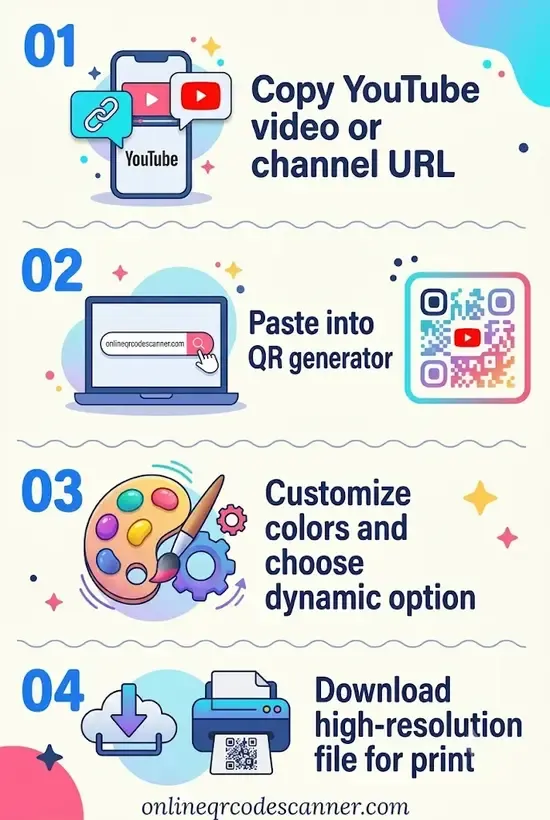
- Copy your YouTube link. On any video or channel page, tap Share → Copy link. For a channel, you can also use your channel handle directly:
youtube.com/@YourHandle. - Paste it above. Drop the URL into the input field and the QR code generates instantly.
- Customize if needed. Change colors or add a logo to match your branding.
- Download and use. Export as PNG or SVG. SVG is the better choice for printed materials because it scales without losing sharpness.
One thing worth knowing: if you want the QR code to trigger a subscription prompt the moment someone scans it, append ?sub_confirmation=1 to your channel URL before pasting. When someone scans the code, YouTube will ask them to subscribe right away instead of just landing on the channel page.
Why a QR Code for YouTube?
YouTube links are long and messy. Sharing youtube.com/watch?v=dQw4w9WgXcQ in print, on a business card, or on a conference slide is impractical. A QR code turns that URL into a scannable square that works even without an internet connection to type anything.
The more interesting use cases happen when physical and digital worlds meet:
Printed materials. Workshop handouts, product packaging, event flyers and any of these can carry a QR code that opens a tutorial or a demo video without requiring the viewer to search for it themselves. According to research published by Olubiyo, O.P. (2026), over 70% of users prefer scanning a physical QR code over manually typing a web address, proving that reducing the steps between a physical prompt and digital content is one of the most reliable ways to increase engagement
Screens and signage. A QR code on a store display or conference presentation lets people pull up a full product walkthrough on their own phone rather than watching a compressed preview on a small screen.
Streaming devices and smart TVs. YouTube itself uses QR codes natively for TV sign-in. When you open the YouTube app on a smart TV and select “Sign in,” the TV displays a QR code. Scanning it with a phone already signed into Google authorizes your TV session without typing on a remote. The QR code simply replaces cumbersome text entry with a quick scan.
A Practical Note on What You Are Linking
This tool encodes whatever URL you paste. That means:
- A specific video: Anyone who scans it lands directly on that video, in the YouTube app if it is installed.
- A channel: They land on your channel page.
- A playlist: They land on the first video in the playlist, with the rest queued up.
YouTube also has a built-in QR code option for sharing channels inside the mobile app (tap the three-dot menu on your channel → Share Channel → QR Code). That works fine for personal sharing. The difference with this tool is that you can customize the design, download a high-resolution file, and use it in print without depending on the app being open.
Related Tools:
- Instagram QR Code Generator
- X (Twitter) QR Code Generator
- Snapchat QR Code Generator
- Telegram QR Code Generator
Frequently Asked Questions
Can I link to a specific timestamp in a YouTube video?
Yes. When you click Share on a YouTube video, there is a checkbox labeled “Start at” that appends a timestamp to the URL (e.g., ?t=145 for 2 minutes 25 seconds). Paste that link into the generator and the QR code will open the video at exactly that point. Useful for tutorials or presentations where you want someone to jump to the relevant section.
Will scanning a YouTube QR code open the YouTube app or a browser?
On most smartphones, the native camera app detects the YouTube URL and opens the YouTube app directly, provided it is installed. If the app is not installed, it opens in a browser instead. You do not need a special scanner; the default phone camera handles it.
Do QR codes generated here expire?
No. A static QR code is just an encoded URL. It does not have a server behind it and does not expire. It will work as long as the YouTube video or channel it points to is still live. If you delete the video later, the QR code will still scan but the link will return a “Video unavailable” error on YouTube’s end, not from the code itself.
How small can I print a YouTube QR code without it failing to scan?
The general rule is no smaller than 1 × 1 inch (2.5 × 2.5 cm) for reliable scanning at a normal distance. Below that, older phone cameras or low-light conditions can struggle. For anything printed at business-card size or smaller, download the SVG version from this tool, which stays perfectly sharp at any size.
How is this different from YouTube’s built-in QR code share feature?
YouTube’s in-app QR code option is quick but gives you a plain black-and-white square with no customization and no downloadable file suited for print. This tool lets you change colors, add a logo, and export a high-resolution SVG you can drop directly into design software or hand to a printer.
Author

Abhishek
Software Engineer & Privacy Advocate
Abhishek is a software engineer and privacy advocate specializing in building fast, secure, and client-side utility applications. He focuses on creating browser-based tools that keep user data local and private.